SilkpathSilkpath: Audit every page of a website for search engines, answer engines and AI.
Silkpath is a free website crawler that visits every page of a site and checks it for technical SEO, AEO (answer engine optimization) and GEO (generative engine optimization). It reports status codes, indexability, titles, headings, links, images, structured data, AI crawler access and llms.txt, page by page, with a site health score and PDF, Excel and CSV exports.
Four steps from a web address to a report you can hand to a client.
1
Enter the address
Type a website address and press Start Crawl. Queue several domains at once, or open Crawl Options to set page limits, speed, robots.txt, sitemap pages, asset download and your own extraction rules.
2
Silkpath crawls
The crawler follows every link from the home page the way a search engine does, reads each page's HTML, respects robots.txt and retries pages that fail for a moment. Watch it live in the Scan Queue.
3
Read the report
The report opens with a site health score out of 100, then every issue, worst first. Each section has filter chips with counts, search and sortable columns.
4
Export, share, repeat
Save PDF, Excel or CSV, share a file through a link, download the site's HTML as a ZIP, compare with the last crawl, or schedule the next one.
The report
Explore a Silkpath report
Sample data from a made-up coffee shop site. Pick a view, then click the numbers, chips, issues and pages to see how a report works.
Report for
harbourroasters.example
310 URLs · health 40/100 · crawled in 1.7s · sample data
Sample report
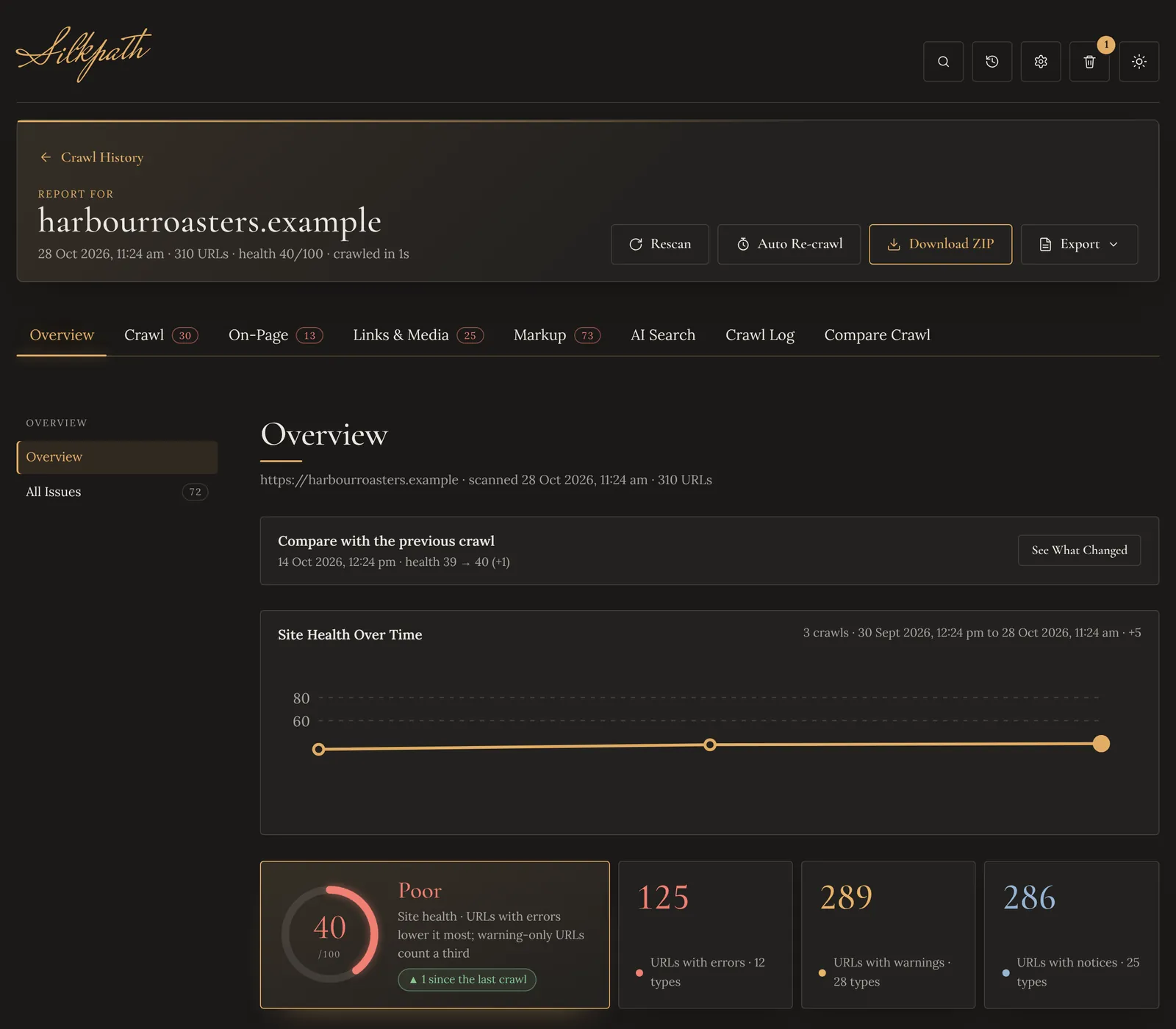
Site health 40 out of 100 (Poor): 125 URLs with errors, 289 with warnings and 286 with notices, up 1 point since the last crawl.
Every issue found, worst first: Validation Errors on 43 pages, Missing Return Tag on 30, Broken Internal Links on 24, 4xx Client Error on 18, Missing H1 on 8, Missing Title on 5.
A map of how the pages link together, from the home page out, with an issue log that lights up the pages that have each issue.
AEO checks per page: JSON-LD, a direct answer in the first paragraph, an author byline, FAQ or HowTo schema and question-style headings.
GEO checks: GPTBot is blocked in robots.txt, the firewall test passed, llms.txt was found and the entity markup is linked.
Compared with the crawl two weeks earlier: health 39 to 40, 30 issues new or worse, 8 fixed or better, 9 URLs added and 4 removed.
Every number above comes from a real kind of check in Silkpath. Run one on your own site.
Each URL is checked once per section. Filters with nothing to show are hidden, so you only see what needs work.
Summary
How healthy is the site, at a glance?
OverviewSite health from 0 to 100 with its grade, health over time, crawl totals, status code mix, site checks, top issues, crawl depth and the domains you link to most.
All IssuesEvery problem found, worst first, with how many pages it affects. A Site-wide tag marks issues that one template fix clears.
01
Crawl
Is every page found, reachable and allowed in search?
All URLsStatus, content type, indexability, click depth, inlinks, outlinks, response time and URL problems such as parameters, uppercase and long addresses.
Status Codes2xx, 3xx, 4xx and 5xx, redirect chains and loops, rate limiting and slow pages.
Indexability and Canonicalsnoindex, X-Robots-Tag, robots.txt blocks, directives, and every kind of canonical problem.
XML SitemapsIndexable pages missing from the sitemap, and redirects, errors or noindex pages inside it.
PageSpeedOptional PageSpeed Insights scores with real-visitor Core Web Vitals (LCP, INP, CLS).
02
On-Page
Does every page say clearly what it is about?
Page TitlesMissing, duplicate, too long or too short, with the pixel width Google uses, and titles that match or ignore the H1.
Meta DescriptionsMissing, duplicate, too long or too short, multiple tags and old meta keywords.
HeadingsMissing, multiple or duplicate H1, long headings, missing H2 and skipped levels.
ContentWord count, thin pages, exact and near duplicates, text-to-HTML ratio and reading ease.
Mobile and AccessibilityViewport and zoom, favicon and manifest, page language, unlabelled fields, empty buttons and links, duplicate IDs.
03
Links and Media
Do the links, images and files all work?
Internal LinksOrphan pages, pages with one inlink or too many outlinks, nofollow inlinks and links to the wrong host.
All Links and External LinksEvery link with its source, anchor text and status: broken, redirected, empty or vague anchors, and sites that refuse crawlers.
ImagesMissing alt text, missing width and height, heavy files, broken images and older formats.
JS and ResourcesStylesheets, scripts and fonts: errors, blocked and third-party files, heavy scripts.
Link GraphAn interactive map of the site with an issue log that lights up the pages.
04
Markup
Can search engines and social sites read the page data?
Structured DataJSON-LD, Microdata and RDFa checked against schema.org rules, with the types expected on the home page, articles, products, breadcrumbs and local businesses.
Open Graph and TwitterThe title, description, image and card a page shows when it is shared.
Can answer engines and AI tools reach, read and quote the site?
AEOJSON-LD, a direct answer in the first paragraph, author bylines, FAQ or HowTo schema and question-style headings.
GEOAI crawler rules, a firewall test with AI user agents, llms.txt, entity schema, content only shown with JavaScript, dates, citations and statistics.
AI VisibilityOptional. Asks Google Gemini, with Google Search on, whether your site is cited for the questions it should answer.
06
Crawl Log and Custom Rules
What did the crawler do, and what else should it look for?
Custom ExtractionPull any value from every page with a CSS selector or a regular expression, such as an author or a price. Up to 10 rules.
Custom SearchList the pages that contain, or are missing, a text or pattern. Up to 5 rules.
Crawl LogThe requests in order, retries, refused pages and why, and the slowest pages.
07
Compare Crawl
What changed since the last crawl?
IssuesEvery check in the older and newer crawl, marked New, Worse, Better, Fixed or Unchanged, with the URLs that changed.
URL ChangesPages added or removed, and pages whose status, title, description or H1 changed.
08
Honest warnings
Silkpath reads raw HTML and does not run JavaScript. If a site builds its pages in the browser, or a firewall answers with a "prove you are human" page, the report says so at the top and in every export, so you never trust numbers about the wrong page.
AI search
Built for answer engines and AI tools
What is AEO?
AEO, answer engine optimization, makes pages easy for answer boxes, featured snippets and voice assistants to quote. A page is ready when it opens with a direct answer, uses question-style headings, carries FAQ or HowTo schema and names its author.
What is GEO?
GEO, generative engine optimization, makes sure AI tools such as ChatGPT, Perplexity, Gemini and Google AI Overviews can reach, read and cite a site. That means AI crawlers allowed in robots.txt and through the firewall, content in the raw HTML, an llms.txt file and clear entity schema.
Simple on purpose. Each URL counts once, however many checks it fails. A URL with an error costs a full point, a URL with only warnings costs a third of a point, and notices cost nothing. The score is 100 minus those points as a share of all URLs crawled.
Good 80 and above
Needs work 60 to 79
Poor below 60
AEO and GEO checks are listed with the issues but never change the score.
Try it: a site of 1,000 URLs
89Good
Functions
Everything around the report
From the first crawl to the hundredth: options, exports, history, schedules and settings.
Before a crawl
Set it up once
Crawl Options
Max pages per domain, parallel requests (1 to 8), delay between requests, domains at once (1 to 5), respect robots.txt, check external links, fetch image sizes and crawl sitemap pages.
Settings
Crawl limits, thin content and heavy image thresholds, storage, dark, light or system theme, 12 or 24 hour time, and a reset to defaults.
Password Protection
The crawler server can be locked with a password, so only people its owner trusts can start crawls. Lock Now locks the app at once.
While it runs
Crawls that look after themselves
Crawls Survive Restarts
Progress is saved while a crawl runs. If the server restarts, the crawl carries on from the last save by itself.
Schedule a Crawl
Pick a date and time and the crawl runs by itself, even while the app is closed.
Auto Re-crawl
Crawl a site again every 1 to 365 days and keep the latest 1 to 50 results, so health over time builds itself.
When it ends
Take the report anywhere
PDF, Excel and CSV
Export what you are looking at: the whole report from the Overview, one tab, or one section exactly as filtered. Branded PDFs with a cover and contents, formatted Excel sheets, plain CSV.
Share Links
Turn a PDF, Excel or CSV file into a link with your own name, lasting 1 to 365 days. Delete a link and it stops working at once.
Website ZIP
Download every page's HTML as a ZIP, optionally with the site's CSS, JavaScript, images, fonts and media (up to 499 MB a crawl) and links rewritten for offline browsing.
Over time
Every crawl kept, nothing lost
Crawl History
Every crawl is saved and listed by website, with health, errors, warnings and indexable share. Open, rescan, compare, export a summary or delete.
Cloud Storage
Crawls are kept in shared cloud storage, so every device shows the same History. Without it, crawls stay in the browser.
Recycle Bin
Deleted crawls wait 30 days before they are erased. Restore one exactly as it was, on every device.
Help and extras
Find anything, check more
Quick Find
Press / or Ctrl+K on any screen and jump straight to any feature, setting or button.
User Guide
A two-part illustrated guide inside the app, with search: features and functions, then every column and filter explained.
Google Checks
Optional PageSpeed Insights with Core Web Vitals, Google Safe Browsing for the site and its links, and AI visibility with Gemini.
Crawl limits and their defaults
Limit
Default
What it controls
Pages per crawl
Up to 10,000
The free server's maximum. Set a lower limit per domain in Crawl Options.
Crawl depth
No limit
How many clicks from the start page to follow.
Parallel requests
3 (1 to 8)
Pages fetched at once. Lower is gentler on the site.
External links checked
3,000
Status of links to other websites. 0 skips the check.
Images checked
3,000
Status, size and format of images.
Script and style files
500
Status and size of JavaScript and CSS files.
Wait for each page
20 seconds (up to 60)
Slower pages are marked as failed. Short failures are retried twice.
Largest page read
8 MB
Bigger pages are cut off at this size.
Website assets
499 MB a crawl
Asset download for the ZIP stops at this total.
silkpath.netlify.app
The Overview of a Silkpath report, as it looks in the installed app.
Install Silkpath on Windows, macOS, Android, iPhone or iPad, with its own window and icon. It opens fast, even offline. On iPhone, tap Share, then Add to Home Screen.
Crawl notifications
Start a long crawl and walk away. When it ends you get a notification, even with Silkpath closed. Tap it and the report opens. It also tells you when a crawl stopped or failed.
No accounts, no tracking
Notifications belong to the device. Turn them on or off in Settings, App and Notifications. On iPhone and iPad they need iOS 16.4 or later.
Silkpath is a free, browser-based alternative to Screaming Frog SEO Spider for most audits, with AEO and GEO built in.
Silkpath
Screaming Frog SEO Spider
Where it runs
In the browser, installable
Desktop app
Price
Free
Free up to 500 URLs, paid licence beyond
AEO and GEO checks
Built in: AI crawlers, firewall test, llms.txt, FAQ schema
With custom extraction
Crawl history and compare
Automatic, with a Recycle Bin
With a licence
Notifications on your phone
Yes
No
JavaScript rendering
No, reads raw HTML and warns
Yes, with a licence
Settings and integrations
The essentials
Very many
Screaming Frog and SEO Spider are trademarks of Screaming Frog Ltd. Silkpath is not affiliated with Screaming Frog. Read the full comparison.
Questions
Silkpath FAQ
What is Silkpath?
Silkpath is a free website crawler for SEO, AEO and GEO audits, created by Raj Meena. Enter a website address and it visits every page, reports technical problems page by page with a site health score, and exports the report as PDF, Excel or CSV.
Is Silkpath free?
Yes. Silkpath is free to use, with nothing to install. Its crawler server runs on free hosting plans.
What does Silkpath check?
Status codes and redirects, security, indexability, canonicals, XML sitemaps, page titles, meta descriptions, headings, content and duplicates, mobile and accessibility basics, internal and external links, images, scripts, structured data, Open Graph, hreflang, and AEO and GEO signals such as AI crawler access and llms.txt.
What are AEO and GEO?
AEO (answer engine optimization) makes pages easy for answer boxes and voice assistants to quote. GEO (generative engine optimization) makes sure AI tools such as ChatGPT, Perplexity, Gemini and Google AI Overviews can reach, read and cite a site.
How many pages can Silkpath crawl?
Up to 10,000 pages per crawl on the free crawler server. You can set a lower limit per domain, a crawl depth and other limits before a crawl.
Does Silkpath run JavaScript?
No. Silkpath reads each page's raw HTML, the way most crawlers and AI tools first see it. A site that builds its pages in the browser looks nearly empty, and Silkpath warns about it so you can check it with a rendering crawler.
Does Silkpath respect robots.txt?
Yes. Respect robots.txt is on by default for every crawl. Turn it off only on a site you own.
Which exports does Silkpath have?
PDF, Excel and CSV for one section, one tab or the whole report, share links for those files, and a ZIP of every page's HTML with optional CSS, JavaScript, images, fonts and media.
Can I install Silkpath and get notified when a crawl ends?
Yes. Silkpath installs as an app on computers and phones. Turn on notifications and each crawl you start sends a notification when it ends, even with Silkpath closed. On iPhone and iPad, add Silkpath to the Home Screen first (iOS 16.4 or later).
Why does Silkpath ask for a password?
The crawler server can be protected with a password, so only the people its owner trusts can start crawls. If you need access, contact Raj Meena on LinkedIn.
Who made Silkpath?
Silkpath was created, designed and built by its founder, Raj Meena.
How is Silkpath different from Screaming Frog?
Silkpath runs in the browser and is free, with no install, and includes AEO and GEO checks such as llms.txt, AI crawler access and FAQ schema. Screaming Frog is a mature desktop crawler with more settings and JavaScript rendering, and a paid licence for large crawls. Many people use both.
Silkpath
See your site the way search engines and AI see it
One crawl. Every page. A report you can act on today.